Smokie is worth trying if you want an Android app and an account you can use on your computer too. Omeweed is worth a look if you want browser access with a guest identity or a group room. Both offer friends and messages.
Published by Smokie, one of the services compared here. We checked Omeweed’s public interface and Smokie’s current feature implementation on October 21, 2026. This is a feature comparison, not an independent call-quality review.
The differences at a glance
| What you need | Smokie | Omeweed |
|---|---|---|
| Browser access | Yes; sign in with Google. | Yes; the public site supports a guest handle. |
| A phone app | Android app on Google Play, plus the website. | Website with a home-screen install option. |
| Individual video chat | Start a search with Light Up. | Random matching through Sesh. |
| Group video rooms | No. Live matching is one to one. | Party Rooms are advertised for groups. |
| Keeping in touch | Friend requests, a friends list, and messages. | A Friends page with direct messages. |
| Browsing people | Swipe through profiles and like people you want to meet. | A social feed and public community features. |
On a small screen, swipe the table sideways. Omeweed sources: homepage and install section, Friends, and Sesh.
What happens when you want to talk again?
Suppose a random chat turns into a good conversation. You want to hear how someone’s week went, rather than hope a future search pairs you again. Both services offer a way to keep that connection.
On Smokie, the details are:
- During a video call, tap Add Friend.
- Sent means your request is waiting for an answer. You are not friends yet.
- When the other person accepts, the status becomes Friends, and you can message each other.
- You can open established friendships through Profile → Friends. Signing in with the same Google account keeps your profile, friends, and messages together across Android and the web.
That last step is useful if you meet someone on your phone but prefer typing longer replies on a computer. Smokie also has Swipe: you can browse profiles rather than start every introduction in a live video call.
On Omeweed, the Friends page also lets you save someone after a session and open a direct message from that list. Its identity menu accepts a handle or an anonymous name. Both services therefore let a conversation continue; keeping in touch is not an exclusive Smokie feature. We did not verify how Omeweed carries a guest identity between devices.
An Android app and a home-screen website are different options
Smokie has a Google Play listing as well as browser access. Android and browser users join the same matching community; a phone user can be paired with someone on a computer.
Omeweed’s homepage offers an install option for putting its website on your phone’s home screen. You can launch it from an icon too. With Smokie, you can install the Android app through Google Play or use the website.
If you prefer installing through Google Play, that is a reason to consider Smokie. If you prefer opening a browser link, both provide that route. Neither installation method, by itself, proves better video quality.
A private introduction or a group smoke circle?
Smokie’s live matching connects two people. There is no public group video room to join. If you want several friends in the same video conversation, Smokie does not currently provide that format.
Omeweed advertises Party Rooms for group conversations. If you want to bring several friends to the same virtual smoke circle, that is the relevant option to check. Our inspection did not include joining a room or measuring how busy it was.
Country filters: check which version of Smokie you are using
Smokie’s Android app offers optional country and gender filters that use gems. Basic matching with Anyone and Anywhere is free; you can see a filter’s gem cost before applying it. The current browser search does not offer those paid filters.
For example, choosing France is an Android matching preference, not a promise that a French user will be available. Opening Smokie on your laptop does not give you that same filter control.
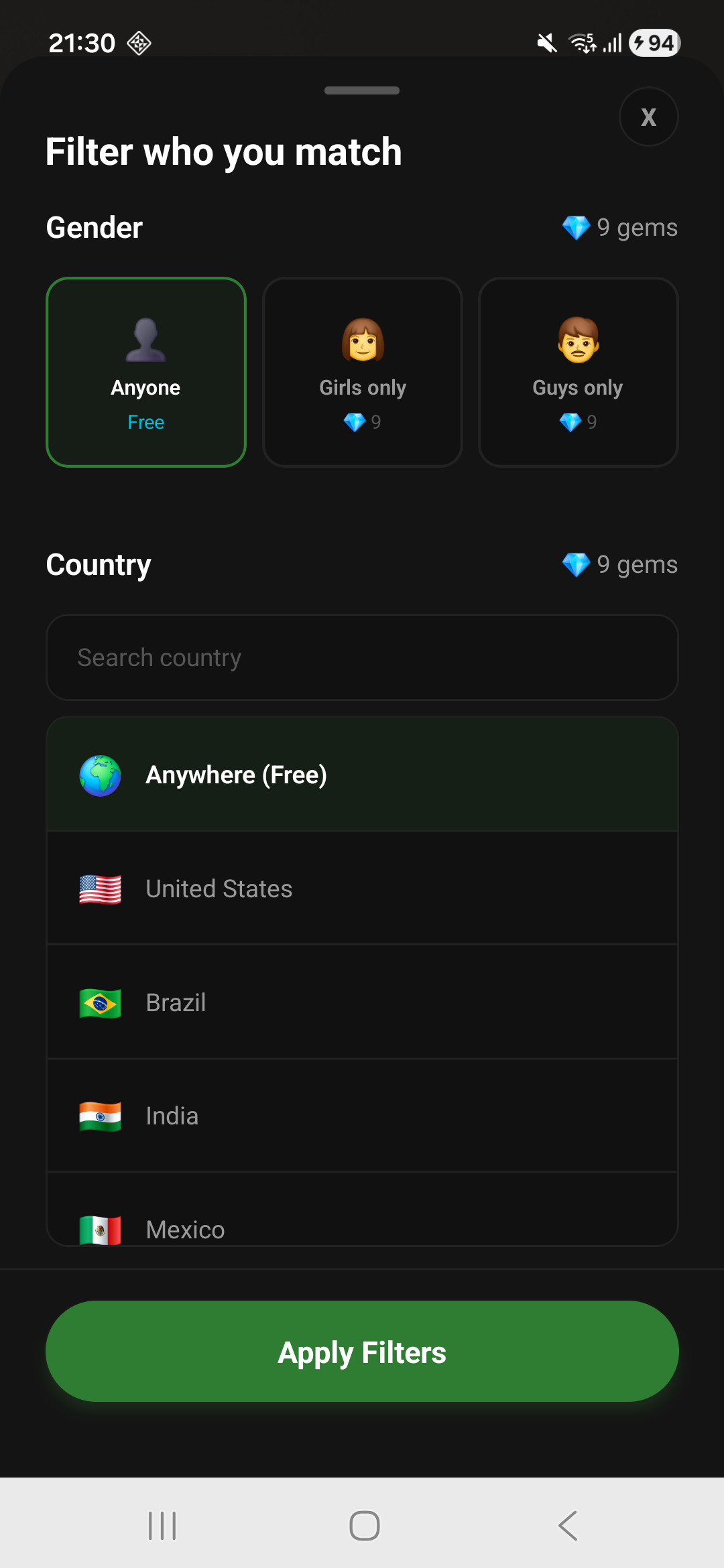
We did not verify equivalent Omeweed filters, so this comparison does not mark them as absent.
What this comparison cannot tell you
We have not measured the two services’ wait times, successful-match rates, or call quality under comparable conditions. Download totals, a homepage counter, and the number of people in a community are different measurements; none tells you how many people are ready to match with you right now.
Start with Smokie if you want a Google Play Android app, a shared Android/web account, and profile browsing alongside individual video chat. Look at Omeweed if a group room or guest-first entry matters more to you. Neither choice guarantees someone will be available at the moment you join.